Starting a podcast can feel overwhelming when you're faced with endless equipment reviews and conflicting advice. The good news is that you don't need a professional studio or thousands of dollars in gear to create quality content that resonates with listeners. This guide breaks down everything you need—software for recording and editing, hardware that captures clear audio, and hosting platforms that distribute your show—so you can focus on what matters most: your message and your audience.
Essential Podcast Recording Software
Recording software is where your podcast comes to life, whether you're recording solo or interviewing guests remotely. The right recording tool should match your technical comfort level and workflow needs.
Remote Recording Platforms
For interview-style podcasts with remote guests, browser-based platforms capture high-quality audio and video locally on each participant's device, then upload the files for seamless editing. Adobe Podcasts offers an excellent all-in-one solution with automatic transcript-based editing and accurate transcriptions, making it ideal for creators who want simplicity without a steep learning curve. Spotify for Creators offers free recording, distribution, and analytics in one platform.
In-Person Recording & Editing Software
If you're recording solo or in-person, Audacity remains the gold standard for beginners—it's completely free, works on Mac, Windows, and Linux, and includes professional-level editing features. Adobe Audition is worth the investment if you need advanced mixing, sound effects, and video integration, starting at $20.99 per month. Hindenburg PRO is specifically designed for podcasters and includes split-track recording, auto-leveling, and superior sound quality starting at $10 per month.
How Podmod AI Fits Into Your Recording Workflow
While recording software captures your audio, Podmod AI works in real time during your conversation to deliver research, facts, and context exactly when you need them. Instead of pausing to search for statistics or fact-check a claim, Podmod listens to your conversation and instantly surfaces relevant articles, images, data, and AI-powered answers—keeping your flow natural and reducing post-production editing. Learn more about how Podmod fits into beginner podcast setups.
Podcast Hardware Essentials
Quality hardware transforms your podcast from "recorded in a closet" to professional-sounding content. You don't need to break the bank, but investing in a few key pieces makes an immediate difference.
Microphones
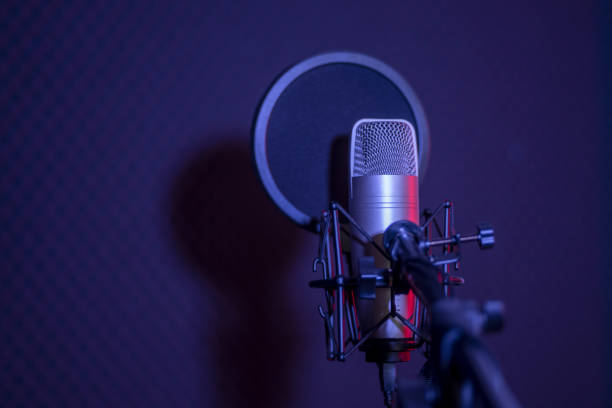
Your microphone is the most critical piece of podcast equipment because it's the first point where your voice is captured. Built-in laptop or phone microphones often pick up unwanted background noise and echoes, creating a subpar listening experience.
USB microphones are the perfect starting point for new podcasters—they're affordable, plug directly into your computer or phone, and deliver clear, high-quality audio without requiring additional equipment. Popular options include the Audio-Technica ATR2100x, Blue Yeti, and Samson Q2U. These typically range from $60 to $130 and work great for solo recording or small setups.
XLR microphones offer professional-grade sound quality and require an audio interface or mixer, making them a better fit for creators ready to invest in a more advanced setup. The Shure SM7B and Rode PodMic are industry favorites.
Headphones
Closed-back headphones are essential for monitoring your audio in real time and catching issues before they ruin a recording. Avoid headphones with built-in microphones—they typically compromise on quality. Look for comfortable, over-ear options like the Audio-Technica ATH-M50x or Sony MDR-7506.
Additional Gear That Elevates Quality
Small additions make a surprisingly big impact on your podcast's sound. A pop filter reduces plosive sounds (like "p" and "b" sounds that cause mic distortion), while a boom arm or mic stand keeps your microphone stable and positioned correctly. Acoustic treatment—even basic foam panels or blankets—minimizes echo and background noise in your recording space.
Podcast Hosting Platforms
Once you've recorded and edited your episode, you need a hosting platform to store your audio files and distribute them to podcast directories like Apple Podcasts, Spotify, and Google Podcasts. Hosting platforms provide RSS feeds that automatically update listeners when you publish new episodes.
Top Hosting Platforms for New Creators
PodBean is an excellent all-in-one choice, offering unlimited storage, unmetered bandwidth, and powerful distribution tools—all with an easy setup process that's perfect for first-time podcasters. Transistor is a feature-rich option starting at $19 per month for up to 20,000 downloads, ideal for creators who expect steady growth. Buzzsprout stands out for its user-friendly interface and helpful tutorials, making it one of the most beginner-friendly platforms available. Libsyn has been around since 2004 and offers reliable publishing and promotion tools starting at $12 per month. For budget-conscious creators, SoundCloud offers a freemium model with paid plans starting at $3.25 per month.
What to Look for in a Hosting Platform
Choose a host that offers unlimited bandwidth so you never pay extra as your audience grows. Look for built-in analytics to track downloads, listener locations, and episode performance. Easy distribution to major podcast directories saves time and ensures your show reaches the widest audience. Finally, consider monetization features like dynamic ad insertion if you plan to generate revenue from your podcast.
Putting It All Together: Your First Setup
A solid beginner podcast setup doesn't have to be complicated or expensive. Start with a USB microphone like the Audio-Technica ATR2100x ($79), closed-back headphones ($50-100), a simple pop filter ($10-20), and free recording software like Audacity. For hosting, choose a beginner-friendly platform like PodBean or Buzzsprout that handles distribution automatically.
As you record, consider using Podmod AI to enhance your conversations with real-time research and fact-checking—helping you create more polished, authoritative content from the start. This combination of quality hardware, reliable software, and intelligent assistance sets you up for podcasting success without overwhelming your budget or workflow.
For more guidance on getting started, explore our complete beginner's guide to podcasting and learn how much it really costs to start a podcast.
Conclusion
Building your podcast toolkit is about choosing tools that match your goals, budget, and technical comfort level. A quality USB microphone, reliable recording software, and a beginner-friendly hosting platform give you everything you need to launch a professional-sounding show. The key is starting with essentials and upgrading strategically as your podcast grows and your audience expands.